Manual
Hosted Self-hosted

Non-hosted manual

Run ProofBetter on your server

This manual covers the complete self-hosted lifecycle: requirements, protected installation, licensing, product use, email, storage, workers, recovery, migration, upgrades, security, and incident checks.

Server operatorWorkspace administratorv3.0.0

What you operate

AreaYour responsibility
InfrastructureDNS, TLS, Apache, PHP, MySQL/MariaDB, capacity, patching
ApplicationInstall, configuration, cron, optional FFmpeg/Node workers, safe upgrades
DataProtected storage, verified recovery copies, retention, off-site copies
DeliveryEmail provider, SPF/DKIM/DMARC, bounce/event monitoring
AccessUsers, roles, 2FA/SSO, permissions, shares, support authorization
CommercialAnnual license activation/renewal and permitted staff/features

Product capability

  • Images, PDFs, local/hosted video and audio
  • Live/snapshot websites and code mockups
  • Contextual comments, voice notes, attachments
  • Versions, batches, advanced compare
  • Workflows, Guided Review, quality checks
  • Protected delivery, approvals, evidence exports
  • Intake, automation, planning, Insights
  • API, webhooks, OIDC, privacy, audit controls by license

Use the right manual

This manual is self-contained for operators and users. If your workspace is on proofbetter.io and you do not administer its server, use the hosted manual.

Production means HTTPS

The protected installer requires the real canonical HTTPS URL on remote servers. Localhost is the only intended non-HTTPS development exception.

Preflight

Plan the installation

Choose a compliant server, domain, database, storage strategy, delivery provider, recovery destination, and license before placing files in the web root.

Server operator30–60 min

Minimum requirements

Componentv3.0.0 requirement
Web serverApache 2.4 with rewrite and .htaccess
TransportPublic HTTPS and canonical URL
DatabaseMySQL 8.0+ or MariaDB 10.6+
RuntimePHP 8.1+
PHP extensionsPDO MySQL, Fileinfo, Mbstring, OpenSSL, Sodium, GD, cURL, ZIP
Recommended PHP limits256 MB memory, 100 MB upload, 120-second request timeout
Optional mediaFFmpeg for normalized derivatives and poster frames
Optional website copiesNode.js 20+, Playwright, Chromium

Choose a self-hosted license

TierStaffv3.0.0 annual catalogNotable capability
Core5$499Core proofing, SMTP, backups, updates
Pro20$999Workflows, branding, reports, automation, API
Agency50$1,999White label, client workspaces, custom domains
EnterpriseNegotiatedFrom $5,000SSO, assisted migration, legal holds, SLA

Confirm the published catalog and agreement before purchase. Each annual key is for one installation and binds to the first installation ID/domain.

Pre-install checklist

Fresh deployment

Install ProofBetter safely

The clean server archive contains production files, runtime dependencies, the protected browser installer, empty private storage folders, documentation, and a SHA-256 manifest.

Server operator20–45 min

Upload and extract

  1. Verify the archive.

    Compare its published SHA-256 checksum and run unzip -t proofbetter-v3.0.0-server-install.zip.

  2. Extract into the HTTPS document root.

    Prefer SFTP. Preserve hidden files, assets/vendor/pdfjs/, and vendor/.

  3. Set conservative permissions.

    Use directories around 0750 and files 0640/0644 as the host requires. Never use 0777.

  4. Allow PHP to write private configuration and storage.

    Make config/ and the required storage/ subfolders writable by the PHP user.

Run the protected installer

  1. Open https://your-host.example/install.php.
  2. For a remote request, retrieve storage/.install-key through SFTP/FTP or the hosting file manager and paste the one-time value into the unlock screen. Localhost and CLI setup do not require it.
  3. Enter the empty database host/name/user/password, canonical HTTPS URL, organization, first administrator, and optional annual license key.
  4. Review preflight, then install. The app writes protected config/config.php, creates/migrates the schema, and seeds only required records.
  5. Sign in, verify Home, and immediately remove or rename install.php after acceptance.
Do not expose secrets

Keep the application key, database password, SMTP/API credentials, and license key only in protected configuration or server environment variables.

Writable storage areas

ProofBetter uses uploads, previews, derivatives, comment-attachments, captions, snapshots, branding, social, mail, and backups. Missing feature folders are created with private permissions when first used.

Local evaluation only

cd /path/to/proofbetter
php -S 127.0.0.1:8787 router.php
# Open http://127.0.0.1:8787/index.php?r=login

Local preview uses the bundled SQLite demo database only for development. Production should use MySQL/MariaDB and HTTPS.

Acceptance

Finish the post-install launch

Do not invite a client until identity, delivery, protected storage, recovery, access, and scheduled work have all been proven.

Installation ownerWorkspace administrator45–90 min

Complete the launch checklist

Home keeps the four essential setup checks visible until completion or dismissal.

Use starter data only on an empty workspace

Settings → Maintenance → Starter demo package adds two fictional clients, two projects, two proofs, and guided comments. It refuses to install over existing work. The guarded workspace reset creates and verifies a full recovery package before preserving the current administrator and clearing workspace data.

Everyday use

Navigate and organize work

Home prioritizes attention, global search locates records, and the Client → Project → Proof → Asset → Version hierarchy keeps access and history predictable.

All signed-in users10 min

Home, My reviews, and search

Home shows launch readiness, proof status, attention filters, and activity. My reviews is the focused reviewer queue. Press Ctrl/Cmd + K for quick actions and global search across accessible proofs, comments/transcripts, projects, and clients.

Mobile keeps setup and primary actions readable without horizontal overflow.

Create the hierarchy

  1. Create the Client with primary contact details.
  2. Create a Project, select the client, and set owner/status/schedule.
  3. Create the Proof with title, reference, due date, workflow, context, tags, and custom fields.
  4. Add one or more Assets, then version each asset independently.

Role boundaries

RolePrimary capabilityScope
AdministratorWorkspace records and user settingsOrganization; platform tools only for installation owner
ManagerClients, projects, proofs, workflows, deliveryOrganization
Editor / ReviewerAssigned proof workExplicit can_view=1 assignments
ClientClient portal and permitted proofsOne assigned client
GuestShared reviewOne expiring link and its permissions

Core workflow

Create every proof type

The source picker supports local files, normalized hosted media, HTTPS websites, and isolated code mockups. Workspace feature switches and license entitlements control availability.

Administrator or manager5–15 min

Create the proof container

  1. Choose New proof.

    Open Home or Proofs.

  2. Enter metadata.

    Title, project, due date, workflow, and reviewer context.

  3. Choose Upload, Media, Website, or Code.
  4. Create and inspect.

    Verify the source, stage, permissions, and preflight.

Upload, Media, Website, and Code share one guarded creation flow.

Source reference

SourceProcedureOperator dependency
Image/PDF/video/audio uploadSelect a validated local file within limitWritable protected storage; byte-range proxy behavior for media
YouTube/Vimeo/Loom/Wistia/Spotify/SoundCloudPaste the provider URL and confirm recognitionOutbound HTTPS and CSP/provider access
Live websitePaste public HTTPS URL; choose viewportFrameable staging policy; optional Review setup bridge
Static website copyChoose snapshot mode and queue captureNode/Playwright/Chromium worker plus cron
Code mockupSupply the accepted isolated HTML/CSS/JS contentCSP/sandbox assets served by app

Website Review setup

  1. Open Settings → Website review.
  2. For a live authorized staging site, copy the generated Review setup script before </body>, publish, and reload the proof.
  3. For static copies, confirm the worker status reads ready, enable the feature, then queue a capture.
  4. Use Interact to operate, Review to inspect marks, and Mark up to draw.
Public-network boundary

Website capture accepts public HTTPS targets and rejects private-network access and cross-origin redirection that violates the safety policy.

Review workspace

Review and annotate every medium

Comments and marks remain tied to the version, visual location, PDF page, time/frame/range, or website context that produced them.

View/comment permission15 min

Visual markup

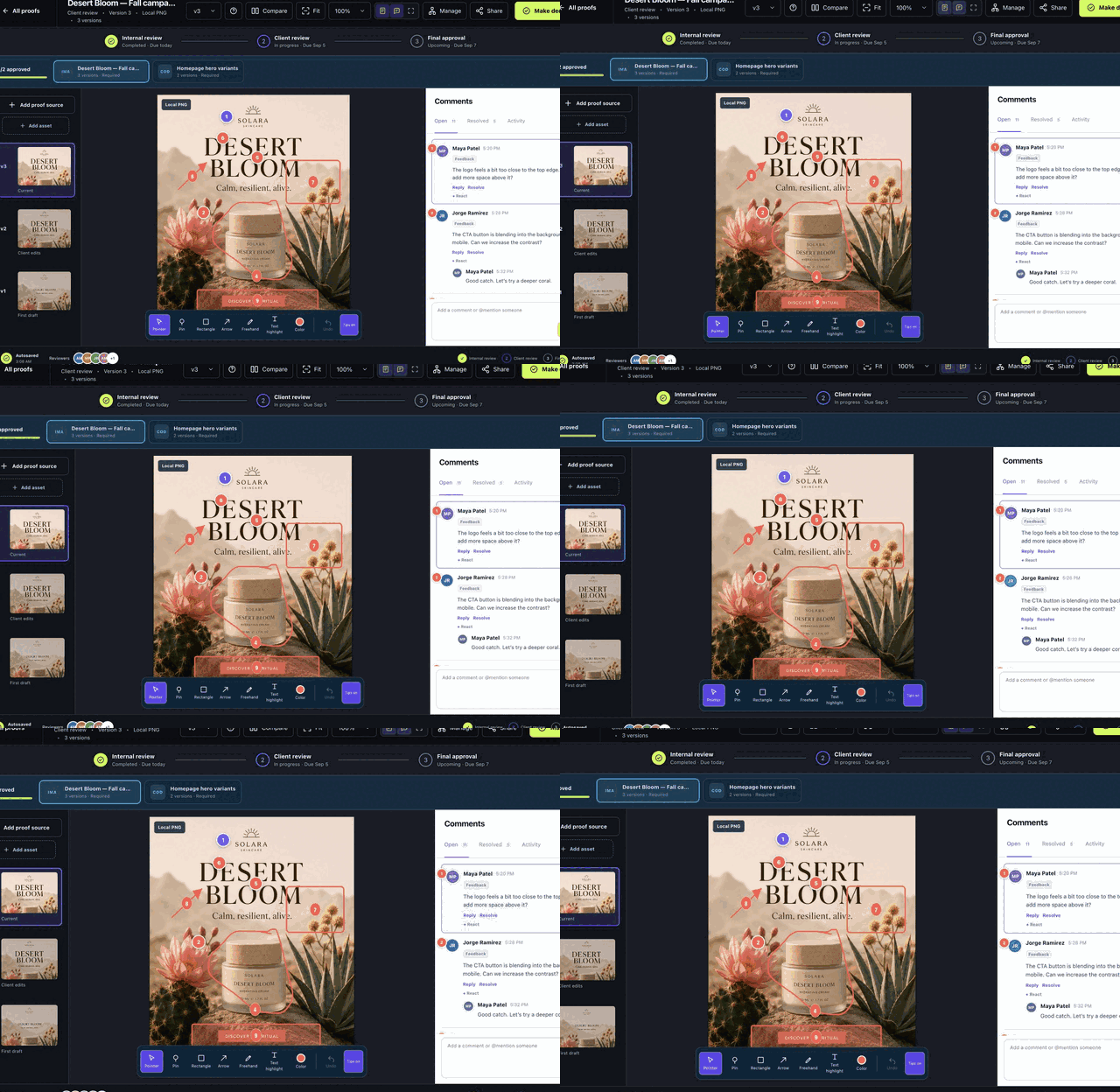
  1. Choose Pointer to select existing markup or Pin, Rectangle, Arrow, Freehand, or Text highlight to create it.
  2. Choose a color, mark the exact target, and write the associated comment.
  3. Add mentions, validated links, files, or an audio note; set label/priority/assignee/due date when authorized.
  4. Post, then click the card or mark to verify two-way navigation.
The review surface, version rail, stage track, and comments remain synchronized.
Animated contextual markup demonstration
Place, discuss, and resolve feedback in context.

Media-specific controls

  • PDF: scroll/page jump, rotation, measurement, text interaction, page-anchored marks, JSON/XFDF/FDF import.
  • Local video: play/seek/volume/speed/fullscreen, frame step, SMPTE, J/K/L, Pause + comment, time ranges and looping, VTT/SRT captions.
  • Local audio: waveform and keyboard seeking, range comments, Pause + comment without irrelevant frame controls.
  • Hosted media: synchronized YouTube/Vimeo; supported Spotify/SoundCloud APIs; selected-time fallback where exact provider control is unavailable.
  • Website/code: Interact, Review, Mark up; bridge anchors live-site marks; snapshot mode gives full-page scroll-safe markup.

Voice notes and transcription

Recording requires HTTPS or localhost. Live browser transcription depends on browser support. Optional post-recording transcription sends the temporary validated audio to the configured fixed provider endpoint, returns editable text, and does not retain the transcription upload. The reviewer can listen, edit, remove, or post.

Revision and flow

Control revisions and review progress

Version each asset independently, gate required batch items, compare changes, and apply reusable sequential or parallel workflows.

Manager or editor15 min

Versions and batches

  1. Select the asset, then Add proof source for its next version.
  2. Use Add asset for another batch item; mark it required or optional.
  3. Review open feedback and use Carry open comments only for issues that still apply.
  4. Use Side, Overlay, Swipe, Blink, Difference, or synchronized local-media compare.

Workflow templates

  1. Create a template, then add/reorder/remove stages.
  2. Choose sequential/parallel behavior, deadlines, reminders, locks, manual/automatic handoff, and completion.
  3. Configure view/comment/decide/manage/download permissions per reviewer/stage.
  4. Assign the template to a proof. Later template edits do not rewrite that proof’s saved stage history.

Guided Review and quality

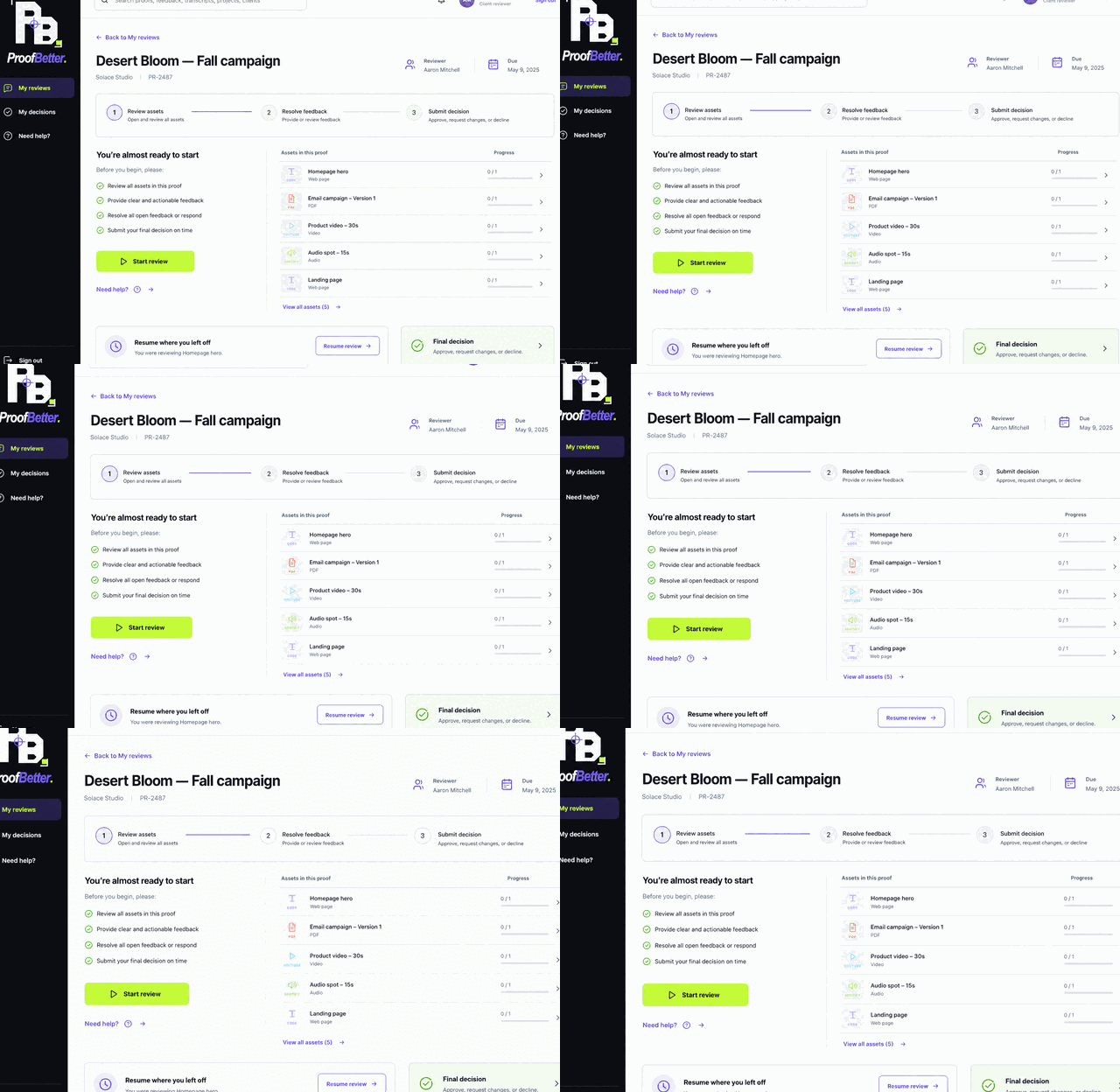
Set Guided Review globally under Interface or override it per proof. Reviewers see overview, required/optional progress, resume state, feedback context, and final decision destination. Editors can preview without impersonation. Preflight, reviewer-specific checklists, decision reasons, quorum, and blocking rules keep approval explicit.

Guided Review animated walkthrough
Guided Review adds focus while Standard review remains available.

Collaboration

Collect feedback and deliver safely

Move from contextual discussion to a formal decision, then preserve evidence and control exactly how clients receive the review.

Comment/decide/manage permissions10 min

Comment lifecycle

Reply, react, resolve, reopen, edit with revision history, relate dependencies, bulk-manage, assign, prioritize, and set due dates. Comments can include protected files, validated links, audio, transcript text, and precise media/page/location context.

Decision and evidence

  1. Complete required checklist items and address blockers.
  2. Choose Make decision and select an allowed result/reason.
  3. Supply a note when the reason requires it and confirm.
  4. Export the review summary, approval CSV/print view, completion PDF, or completion ZIP manifest.

Send a protected review

  1. Choose the proof and version.
  2. Enter recipient, expiry, and message.
  3. Choose watermark, email verification, and download permission.

    Original download is off by default.

  4. Send, verify delivery, and test in a private window.
The protected handoff sends an expiring link instead of an attachment.

Scale the workflow

Standardize intake and measure results

Use public request forms, proof templates, conditional automation, planning, drillable analytics, scoped API tokens, and signed webhooks.

Administrator or managerLicense entitlement may apply

Intake and automation

  1. Create a request form with only essential required fields and share its protected public URL.
  2. Review a submission, select client/project/template, and convert it into a proof.
  3. Use proof templates for workflow, checklist, due offset, priority, tags, custom fields, and reminders.
  4. Use narrow automation conditions and inspect job history before retrying.
  5. Use expiring read-only API tokens, HMAC-signed outgoing webhooks, or protected inbound endpoints—never administrator credentials.

Reports and Insights

Reports status/client segments open their underlying proofs. Insights exposes approval cycle, comments per proof, versions per proof, on-time completion, client workload, reviewer throughput, and completion exports. Every detail view supports role-scoped search, status filtering, proof navigation, and formula-safe CSV.

Metrics are links to the accessible records that produced them.

Workspace administration

Configure identity, access, and security

Separate workspace controls from installation-owner controls, and grant the least privilege needed for each user and integration.

AdministratorInstallation owner for platform controls

Workspace and brand

Set organization name, locale, time zone, retention, Simple/Advanced interface, Guided Review default, upload sources/limits, checklists, decision reasons, and sharing metadata. Brand presets and three focused color roles flow to app/email output; contrast guards reject unreadable combinations. Social cards accept validated 1200×630 imagery while review pages remain no-index.

Users and permissions

  1. Invite the email and assign Administrator, Manager, Editor, Reviewer, or Client.
  2. Client requires one client workspace; editors/reviewers need explicit visible proof assignment.
  3. Grant view/comment/decide/manage/download individually, using inherited client/project rules only where predictable.
  4. Disable the account or revoke sessions when access ends.

2FA, SSO, privacy, and governance

  • Enable TOTP and store eight recovery codes off-browser; optionally require 2FA for the workspace.
  • OIDC company sign-in uses authorization code, PKCE, state, nonce, verified email, invited-account matching, and SSRF-safe public HTTPS discovery/targets.
  • Personal data export and confirmed deletion obey deletion windows and legal holds.
  • Support access is explicit and time-limited. Audit events are tamper-evident and retained by policy.
Security settings expose user-facing controls without mixing in unrelated server details.

Delivery

Configure and prove email delivery

Select the provider your server can operate, encrypt credentials with the application key, authenticate the From domain, and send a real test before invitations.

Installation owner20–60 min

Choose a delivery path

TypeProvidersNotes
APIPostmark, SendGrid, Mailgun, Brevo, SMTP2GO, SparkPost, SendLayerFixed HTTPS endpoints and clearer event diagnostics
Microsoft APIMicrosoft 365Protected application credentials
SMTPGeneric SMTP plus Google, Microsoft, Zoho, Yahoo, iCloud, Fastmail presetsPreset fills transport; you supply mailbox and app password
AmazonSES through SMTPUse region-specific credentials/host
Shared host fallbackPHP MailTest explicitly; authenticated SMTP/API is more observable

Configure and test

  1. Open Master settings → Email delivery.
  2. Choose the provider and enter sender identity plus required secrets. Leave a secret field blank later to keep the encrypted saved value.
  3. Optionally configure SMTP fallback after API/Microsoft failure; test primary and fallback independently.
  4. Publish SPF, DKIM, and DMARC for the From domain.
  5. Send a test to a monitored inbox and verify delivery, authentication results, reply behavior, and sanitized outbox status.
  6. Configure signed provider events where supported and monitor bounce/retry activity.
The settings screen exposes common providers first and additional choices progressively.

Failure behavior

A primary API/Microsoft failure can retry through configured SMTP once. If both fail, the outbox records a sanitized error and uses the normal bounded retry delay. Never expose raw provider responses containing secrets to workspace users.

Scheduled work

Run cron and optional workers

The five-minute runner drives mail, reminders, media, snapshots, recovery schedules, billing/license lifecycle, health checks, retries, and stale-job recovery.

Server operator15–45 min

Schedule the runner

*/5 * * * * /usr/bin/php /absolute/path/to/proofbetter/cron.php

# Run once while testing:
/usr/bin/php /absolute/path/to/proofbetter/cron.php

Use the production PHP binary, user, environment, and file permissions. Alert on non-zero exit and inspect the hosting/PHP error log plus Operations.

Install static website capture

cd /absolute/path/to/proofbetter/workers
PLAYWRIGHT_BROWSERS_PATH=0 npm install
PLAYWRIGHT_BROWSERS_PATH=0 npx playwright install chromium
  1. Confirm Node.js 20+, npm, and a compatible Chromium environment.
  2. Run setup under the same server user that cron uses.
  3. Open Settings → Website review and confirm Static Copy reads Ready.
  4. Queue a public HTTPS capture and verify it becomes Snapshot Ready.

Configure FFmpeg and transcription

FFmpeg is optional; when unavailable, authorized source streaming remains. Verify its path/codecs and regenerate derivatives after correcting a failure. Post-recording transcription is optional: store the provider key encrypted, choose model/language hint, test a short recording, and understand the 25 MB validated-audio and session-rate boundaries.

Supervise jobs

Jobs track retry limit, progress, worker lock, heartbeat, idempotency key, dead-letter time, and cancellation time. Correct the dependency before manual retry. Exhausted jobs move to Needs attention; dismiss only after the underlying work is intentionally abandoned.

Evaluation access

Operate the email-verified demo

Installation owners can expose one isolated 30-minute workspace per validated email while keeping expiration, cleanup, and repeat-interest routing under operator control.

Installation ownerServer operatorv3.0.0

Enable only after readiness

  1. Configure email, SPF, DKIM, DMARC, and a monitored sender; send a real test.
  2. Schedule cron.php every five minutes and verify protected storage is writable.
  3. Open Plan & billing → Commercial controls.
  4. Set the demo sales follow-up inbox, enable Private 30-minute demo, and save.
  5. Submit a controlled address, validate the six-digit code, confirm the timer begins after acceptance, then expire and clean the test record.

Lifecycle and data boundary

StateOperator expectation
RequestedHMAC-protected code, ten-minute validity, bounded attempts/resends, no workspace or timer
ActiveOne isolated Studio workspace, visible countdown, 30-minute expiry
ExpiredUser inactive, sessions revoked, organization suspended, projects/proofs/uploads removed
RepeatNo second workspace; one confirmation to requester and one sales notification

The demo request retains a minimal name/email/status tombstone after cleanup to enforce the one-use rule. It contains no active review content.

Monitor cleanup

The five-minute cron run reports demo records cleaned or awaiting retry. Remote object deletion failures remain cleanup_pending and retry on later runs. Investigate repeated pending records before disk or object-store usage grows.

Production default is closed

A production installation does not expose self-service demos until the installation owner enables the control. Disable it immediately if delivery or cleanup becomes unhealthy.

Data plane

Operate protected storage and domains

Local protected storage is the zero-configuration default. S3-compatible storage, metadata scrubbing, derivative regeneration, quotas, and custom domains are optional platform controls.

Installation ownerServer operator

Protected local storage

  • Keep storage/ blocked from direct web access; files stream only through authorization-checked routes.
  • Back up the full tree with the database and application version; relationships depend on both.
  • Confirm reverse proxies pass Range for local audio/video seeking.
  • Monitor uploads, previews, derivatives, captions, snapshots, branding, social media, attachments, mail previews, and backups separately.

S3-compatible storage

  1. Open Master settings → Platform and enter public service endpoint, region, bucket, and protected credentials.
  2. Run the object-storage readiness test before switching.
  3. Confirm per-client keyring/metadata-scrubbing policy and quotas.
  4. Upload, stream, and delete a non-confidential test object; verify recovery includes required configuration.

Custom domains

  1. Create DNS for the intended hostname and terminate valid HTTPS.
  2. Add the domain in Platform settings and complete verification.
  3. Confirm the organization mapping; hostname never replaces normal authorization.
  4. Test login, protected file streaming, guest review, email links, and webhook/API base URLs.

Recovery Center

Create recovery you can trust

A backup is usable only after archive, manifest, every recorded file, and restore steps have been verified—and a protected copy exists off the application server.

Installation ownerWeekly operating task

Choose a package scope

ScopeUse
Full siteApplication/data recovery, update snapshot, or migration source
Review filesProtected uploaded/generated media without full database recovery
Database onlyRecord-level recovery or frequent lightweight copy

Packages include a machine-readable manifest, per-file SHA-256, archive checksum, and recovery guide. Server config, application key, mail previews, Node modules, nested backups, and other excluded runtime material are handled by documented secure procedures.

Create, verify, and take off server

  1. Open Settings → Maintenance and create a Full-site package.
  2. Choose Verify. Do not trust the package until every manifest entry passes.
  3. Run Restore preflight and read its included RECOVERY.txt.
  4. Download the private no-store archive to encrypted off-server storage.
  5. Configure daily/weekly scheduled packages and retention. Manual packages are never silently pruned.
  6. Optionally configure encrypted WebDAV/S3-compatible delivery with a separate 16+ character passphrase stored outside the server.

Rehearse recovery

At least quarterly, restore into an empty HTTPS staging root and empty database, sign in, open multiple proof types, verify protected media/comments/email/cron, and record the restore drill. Never discover missing extensions or credentials during an incident.

Change safely

Move, upgrade, and roll back

Use the keyed two-file migration for server moves and an adjacent immutable version folder plus verified recovery for upgrades.

Installation ownerServer operator

Move to another server

  1. Build and verify a Full-site package.
  2. Choose Move server.

    Download installer.php and the matching randomly named ZIP; store the one-time key privately. It is shown for one hour and the installer expires after seven days.

  3. Prepare an empty destination.

    Empty HTTPS web root and empty MySQL/MariaDB database; never rename the ZIP.

  4. Open the destination installer.

    Enter the key, confirm all preflight items, final URL, and new database details, then Verify and restore.

  5. Accept and clean.

    Sign in, test proofs/media/comments/email/cron, then remove installer and uploaded ZIP immediately.

Safety boundaries

The installer refuses existing ProofBetter files/tables, validates archive/file hashes and paths, rejects symlinks, stages before publish, writes a completion lock, and leaves the source untouched.

Upgrade beside the current release

  1. Create, verify, preflight, and download a Full-site package.
  2. Upload v3.0.0 into a new adjacent folder; do not overwrite the live folder.
  3. Copy only protected production config/config.php and the complete storage/ tree.
  4. Point a staging hostname at the new release. Opening the app runs idempotent database migrations.
  5. Run smoke/security/commercial/release checks, test all media and roles, then switch traffic.
  6. Keep the old version folder and verified package through the rollback window. Roll back application and data consistently if required.

Dependability

Run system checks and release gates

The installation owner gets one plain-language view of the application, database, workers, email, storage, recovery, incidents, jobs, and update readiness.

Installation owner only10 min

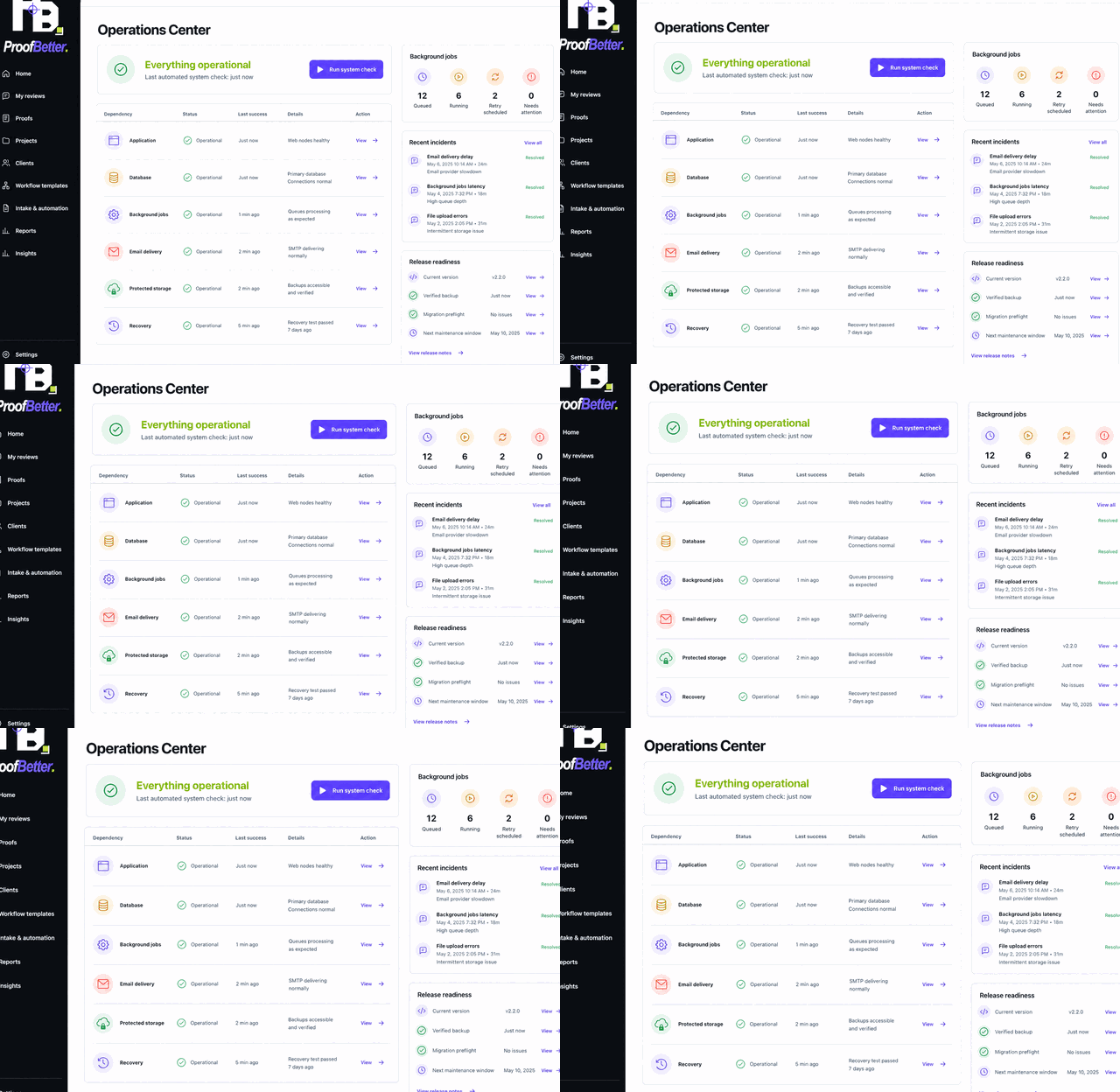
Run the six dependency checks

  1. Open Operations and choose Run system check.
  2. Review Application, Database, Background jobs, Email delivery, Protected storage, and Recovery.
  3. Open any incident created by a warning; fix the dependency, then rerun. Healthy checks automatically resolve matching incidents.
  4. Review queued/running/retry/Needs attention jobs and intervene only after diagnosing the dependency.
Operations is installation-owner-only because it exposes server-wide health and controls.
Animated Operations Center walkthrough
Walkthrough: inspect bounded checks, queues, and incidents.

Release readiness

Open Release Readiness and confirm application version, verified recovery, schema/migration preflight, rollback plan, and the complete deployment checklist. The feature does not perform an unsafe automatic update; it makes the prerequisites visible.

Commercial operation

Activate and maintain the license

A verified self-hosted purchase issues an encrypted annual key for one installation. Activation binds the key to its first installation ID and public domain.

Installation ownerAnnual lifecycle

Activate

  1. Retrieve the key only from the authenticated billing center after verified Stripe one-time completion or confirmed PayPal capture.
  2. Enter it during install or in the protected license configuration flow.
  3. Confirm the HTTPS activation endpoint, random installation ID, and canonical domain.
  4. Run cron and confirm the last successful license validation appears in operational status.

Renew or move

Annual renewal extends updates and validity under the customer agreement. A server/domain move requires an authorized activation reset plus the verified backup/migration procedure. Keep the full key out of tickets, email, logs, screenshots, and client-visible settings.

Short activation outages

Define the contractual validation-grace policy before production. A brief activation-service interruption should not unexpectedly remove client review access; investigate connectivity and last-success time before resetting anything.

Hardening

Maintain a secure installation

Combine application authorization with operating-system, web-server, database, delivery, recovery, and organizational controls.

Server operatorInstallation owner

Production hardening

  • Force HTTPS, keep HSTS, security headers, CSP, opener, permissions, and no-index protections intact.
  • Block direct config/ and storage/ access; keep display_errors off.
  • Use random application/database keys, least privilege, encrypted credentials, and restrictive file ownership.
  • Do not add unsafe-eval to the main CSP; the Spotify frame has its own narrow policy.
  • Keep signed webhook/OTP/reset/rate-limit boundaries and private-network target validation enabled.
  • Require 2FA for privileged staff and use time-limited support access.

Cadence

FrequencyTasks
Every 5 minutesCron; alert on non-zero exit
DailyFailed jobs, mail events, source errors, unusual guest activity, quotas
WeeklyVerified recovery/off-site copy/restore preflight; representative media/share tests; queue remediation
MonthlyPatch PHP/Apache/database/PHPMailer/FFmpeg/Node/Playwright/Chromium; review users/2FA/permissions/shares/templates/retention; verify TLS and email DNS
QuarterlyRestore rehearsal, migration rehearsal, least-privilege review, incident tabletop

Reference

Troubleshoot self-hosted ProofBetter

Use the symptom to isolate runtime, permissions, proxy, provider, worker, or data dependencies. Preserve evidence before changing production state.

Server operatorAdministrator

Common failures

SymptomCheck
Blank pagePHP error log; keep display_errors off in production
Upload failsupload_max_filesize, post_max_size, app limit, storage ownership/quota
Local media cannot seekRange reaches index.php?r=file; proxy does not strip it
Derivative failsFFmpeg path/codecs and cron permissions; source streaming should remain
Static website copy failsNode dependencies/Chromium, public HTTPS target, no cross-origin redirect, renderable assets
Website refuses to frameCooperative staging frame-ancestors or snapshot mode
Website annotation hidden/movesInstall bridge, reload for legacy-anchor upgrade, or capture snapshot
Email failsSend test, sanitized outbox, cURL/TLS/credentials/provider authorization/SPF/DKIM/DMARC/fallback
PDF pages failassets/vendor/pdfjs/pdf.min.mjs, worker file, Apache .mjs MIME mapping
Spotify ConnectingOutbound access to open.spotify.com and embed-cdn.spotifycdn.com
Migration unlock failsCorrect one-time key, under seven days, HTTPS, attempt limit
Migration package missingBoth files together; randomly named ZIP not renamed
Destination not emptyUse a new web root and empty database; refusal is intentional
License validation failsCanonical domain, activation URL, outbound HTTPS, installation ID, last-success time

Evidence to collect

  • UTC/local time, route, user role, proof reference/version/source type
  • Relevant PHP/web-server/cron/job error without secrets
  • Operations dependency state and incident/job ID
  • Browser/OS and reproducible steps
  • Package/application/database version and recent change
  • Screenshot with unrelated client data redacted

Useful commands

# Verify PHP and required modules
php -v
php -m

# Run scheduled work once
php /absolute/path/to/proofbetter/cron.php

# Test the clean archive
unzip -t proofbetter-v3.0.0-server-install.zip

# Local application smoke suite (source tree only)
php tests/smoke.php
Escalate without secrets

Share sanitized errors and references. Never send application keys, database passwords, SMTP/API/payment secrets, recovery passphrases, or the full license key.

Try “cron”, “website snapshot”, “email”, “move server”, “PDF”, or “license”.